
The Guardhouse API gives external systems programmatic access to your incident reports, live operations, timesheets, staff, customers, sites, and webhook event subscriptions. It is a JSON REST API over HTTPS, secured with short-lived JWT bearer tokens that you obtain by exchanging an API key.
Generating an API key
API keys are generated inside the Guardhouse web app. You need SuperAdmin access to do this.
- Log in to the Guardhouse web app.
- Go to Organization → Company Settings.
- Open the Guardhouse API & Integrations tab.
- Select the Guardhouse API sub-tab.
- Find the API type you need and click Generate API Key
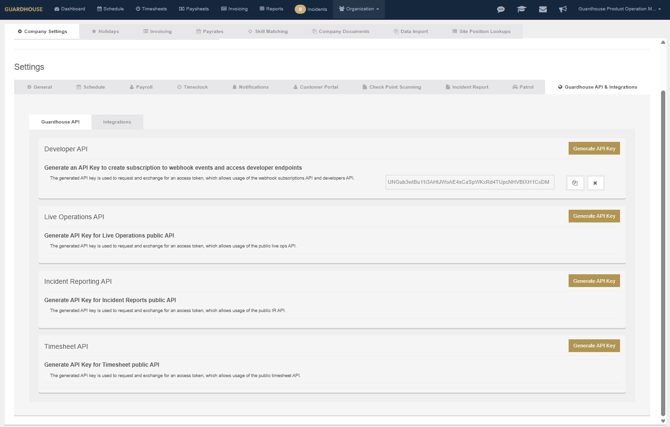
| API type | KeyType |
Grants access to |
|---|---|---|
| Developer API | developer |
Webhook subscriptions, staff, and developer endpoints |
| Live Operations API | liveops |
Live Operations endpoint |
| Incident Reporting API | incidentreport |
Incident report endpoints |
| Timesheet API | timesheet |
Timesheet endpoints |
Important: The key is shown only at the moment it's generated. If it's lost, you'll need to generate a new one.
For full access to our API documentation, please contact your Customer Success Manager.